PDF Processing Pipeline Documentation
Overview
A document processing pipeline is a structured sequence of steps that transforms raw, unstructured documents into formats suitable for training or inference with Large Language Models (LLMs). Its importance lies in ensuring data quality, relevance, and usability, which directly impact LLM performance.
Docling: Next‑Generation Document Processing
Overview
Docling is a powerful document parsing tool designed to extract structured, layout-aware content from various file types such as PDF, DOCX, PPTX, HTML, and more. It transforms these documents into a rich unified representation that retains important elements like layout, headings, tables, and sections. This makes the documents ideal for generative AI workflows, including Retrieval-Augmented Generation (RAG).
Docling is integrated with LangChain via the DoclingLoader, which allows seamless integration of complex documents into LLM pipelines.
Architecture
The architecture consists of the following components:
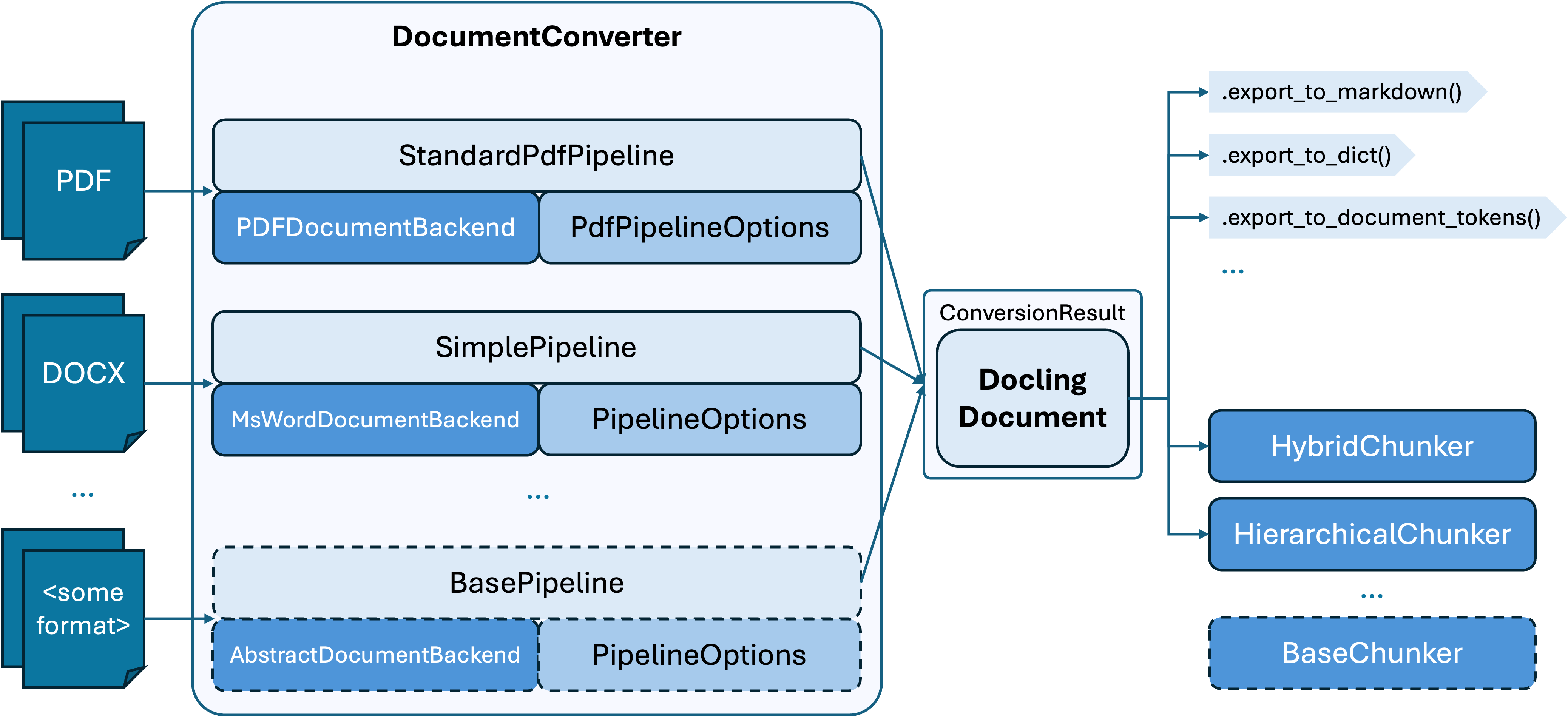
In a nutshell, Docling’s architecture is outlined in the diagram above.
For each document format, the document converter knows which format-specific backend to employ for parsing the document and which pipeline to use for orchestrating the execution, along with any relevant options.
🔧 Key Features
✅ Supports multiple document formats: PDF, DOCX, PPTX, HTML, and more.
✅ Preserves layout, tables, headings, and sections.
✅ Converts documents into formats optimized for LLMs.
✅ Works natively with LangChain.
✅ Supports two export modes for flexibility:
ExportType.DOC_CHUNKS: Splits documents into smaller chunks, each treated as a separate LangChain Document.
ExportType.MARKDOWN: Converts the entire document into a single markdown-formatted LangChain Document.
🚀 Installation
To install Docling, use the following command:
`bash
pip install -qU langchain-docling
`
This will install the latest version of Docling along with the necessary integrations for LangChain.
📦 Usage
To use Docling, you can import the DoclingLoader and specify the document path and export type. Here’s a simple example:
1. Import Required Modules
from langchain_docling import DoclingLoader
from langchain_docling.schema import ExportType
ExportType.DOC_CHUNKS – Document is split into chunks
ExportType.MARKDOWN – Whole document as a single markdown output
export_type = ExportType.DOC_CHUNKS # or ExportType.MARKDOWN
3. Load Document
Specify the document path and export type:
doc_path = "path/to/your/document.pdf"  # Specify your document path
loader = DoclingLoader(doc_path, export_type=export_type)

# Load the document
documents = loader.load()
This will load the document and return a list of LangChain Document objects, each containing the extracted content.
4. Use with LangChain
Once loaded, the documents can be passed into any LangChain component like a retriever, summarizer, or question-answering chain.
📁 Supported File Types
.docx
.pptx
.html
.txt
Other common document formats
📄 PDF Data Extraction docling
🧠 Goal
We will:
Extract all content from a PDF
Save the content in a DocLing-compatible format (e.g., HTML or Markdown with clear structure)
Optionally generate metadata for easier annotation
✅ 📄 Code: PDF Extraction for DocLing Annotation
# Required Libraries
import os
import pdfplumber
import fitz  # PyMuPDF
from pathlib import Path

# Create Output Folder
output_dir = Path("docling_output")
output_dir.mkdir(exist_ok=True)

def extract_pdf_content(pdf_path):
    """
    Extracts text, images, and tables from a PDF file.
    Outputs a structured HTML-like file ready for DocLing annotation.
    """
    output_file = output_dir / f"{Path(pdf_path).stem}_docling_ready.html"


    ..................................................
    ..................................................
    # The function code is in `structuration_pdf.ipynb`. Open the notebook to view and experiment.
    ..................................................
    ........................................................


    print(f"✅ Extracted content saved to: {output_file}")

# Example usage
extract_pdf_content("example.pdf")
code-link:
GitHub link - for DocLing Annotation code
🔎 Output
✅ docling_output/example_docling_ready.html: contains all structured content
✅ Images saved as page1_img1.png, page2_img1.jpg etc.
✅ Human-readable format for manual annotation in DocLing
🧠 How to Use with DocLing
1. Open the HTML file in a browser or upload it to a DocLing-compatible editor
2. Use DocLing to:Add metadata (e.g., title, author)
Annotate sections (e.g., introduction, methods, conclusion)
Tag named entities (dates, places, etc.)
✅ Summary
| Feature | Included |
|---|---|
| Text Extraction | ✅ |
| Table Extraction | ✅ |
| Image Extraction | ✅ |
| Prepares for DocLing | ✅ |